AI Agent Deployment Patterns: Architecture Choices for Enterprise Production
By Delos Intelligence — 2026-07-27
Pilot success doesn't guarantee production reliability. This guide covers four AI agent deployment patterns — single-agent, multi-agent orchestrated, human-in-the-loop, and edge — with architectural decisions for state, error handling, and rollback.
Why Deployment Architecture Matters for AI Agents
An AI agent that performs flawlessly in a pilot is not the same as an AI agent that runs reliably in production. The difference is rarely the model — it's the deployment architecture.
In a pilot, the agent operates in a controlled environment: one user, one workflow, one integration, generous timeouts, and a human watching every output. In production, the agent faces concurrent users, shared resources, rate limits, network partitions, and edge cases the pilot never exercised. A 2025 Gartner analysis found that 74% of enterprise AI agent projects stall at the deployment stage — not because the agent lacks capability, but because the architecture can't sustain it.
Deployment architecture determines four things that directly affect business outcomes:
- Reliability: Will the agent complete tasks correctly under load?
- Cost efficiency: Are you paying for idle capacity or over-provisioning?
- Compliance: Can you prove what the agent did, when, and why?
- Scalability: Can you add a second agent without rebuilding the first?
The deployment pattern you choose is the foundation. Get it wrong, and you'll spend months patching reliability issues that architecture should have prevented.
Single-Agent Deployment Pattern
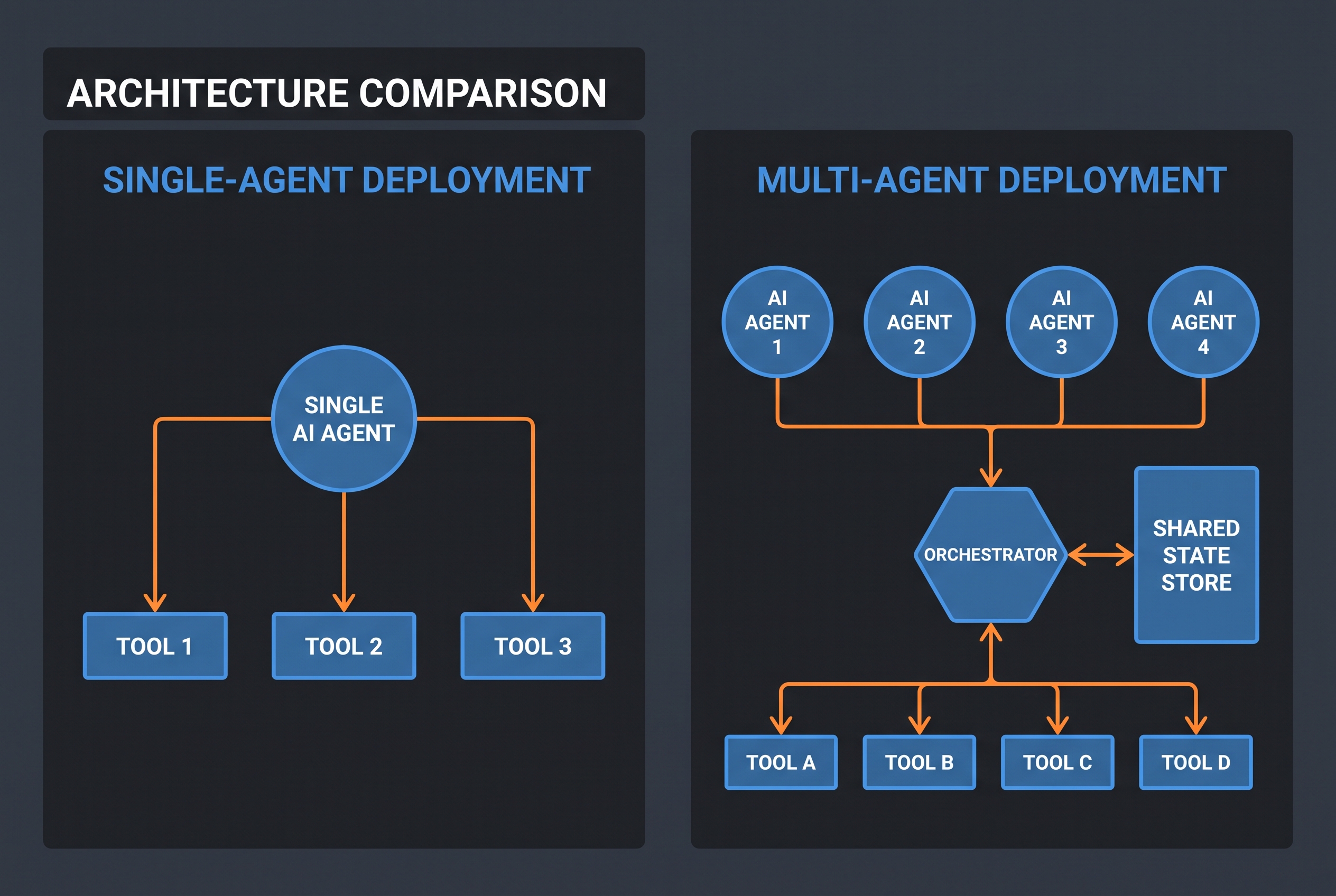
The simplest pattern: one agent, one task domain, one set of tools. The agent receives a request, reasons through it, calls tools as needed, and returns a result. All state lives in the agent's context window or a single session store.
!Single-agent vs multi-agent deployment architecture
When to use it:
- The task is well-bounded with a clear input and output
- One agent can handle the full workflow without specialization
- You're deploying your first AI agent and need to validate the use case
- Throughput requirements are modest (under 100 tasks per hour)
Architecture components:
- One agent instance with a defined tool set
- A session store for conversation context (Redis or database-backed)
- An API gateway that routes requests to the agent
- Basic logging (request, response, tool calls)
Strengths: Simple to build, debug, and monitor. No coordination overhead. Easy to reason about state. Fast time-to-production.
Weaknesses: Single point of failure. The agent becomes a bottleneck for high-volume workloads. No parallelism — tasks queue sequentially.
Best for: Content generation, document summarization, single-system queries (e.g., CRM lookups), and any task where one agent's context is sufficient to complete the work.
This pattern is where every enterprise should start. It validates the agent's capabilities, surfaces integration issues, and builds organizational trust — all before you introduce the complexity of multi-agent coordination.
Multi-Agent Orchestrated Deployment
When a single agent can't handle the full workflow — either because the task requires multiple specializations or because throughput demands parallelism — you need an orchestrated multi-agent architecture.
In this pattern, a coordinator (either a dedicated orchestrator agent or a rule-based router) receives the incoming request, decomposes it into sub-tasks, assigns each sub-task to a specialized agent, and merges the results.
When to use it:
- The workflow spans multiple domains (e.g., sales + finance + legal review)
- Task volume exceeds what one agent can handle sequentially
- Different steps require different tool sets or system access
- You need parallel execution to meet latency targets
Architecture components:
- Multiple specialized agents, each with scoped tools and permissions
- An orchestrator (agent or deterministic router) that manages task decomposition and assignment
- A shared state store (e.g., Redis, Postgres) that agents read from and write to
- An event bus or message queue (e.g., RabbitMQ, SQS) for inter-agent communication
- Distributed tracing to follow a request across agents
Strengths: Parallelism, specialization, and resilience — if one agent fails, the orchestrator can retry or reassign. Each agent's context stays focused, reducing token costs and improving accuracy.
Weaknesses: Significantly more complex to build and debug. State management becomes a first-class concern. You need distributed tracing to understand failures. The orchestrator itself is a new failure point.
Best for: Complex multi-step workflows (e.g., "process this customer onboarding: verify identity, set up billing, create support account, send welcome email"), high-throughput environments (500+ tasks per hour), and workflows where different steps have different compliance requirements.
Hybrid Human-in-the-Loop Deployment
Not every task should be fully automated. For high-stakes actions — financial transactions, contract modifications, customer-facing communications — the agent prepares the work and a human approves it before execution. This is the human-in-the-loop pattern.
The agent does the heavy lifting: gathers context, drafts the action, validates inputs, and presents a recommendation. A human reviewer sees the agent's reasoning, the proposed action, and the supporting evidence, then approves, modifies, or rejects it.
When to use it:
- The action is irreversible or has significant financial/legal impact
- Regulatory requirements mandate human oversight (e.g., GDPR, MiFID II, HIPAA)
- The agent's accuracy is high but not yet at autonomous threshold (85-95%)
- Stakeholder trust requires visible human checkpoints
Architecture components:
- The agent with its tools and reasoning loop
- An approval queue (e.g., a task queue with a human-facing UI)
- A review interface that surfaces the agent's reasoning trace, proposed action, and confidence score
- A feedback loop that records human decisions back into the agent's training data
- Full audit logging of both agent proposals and human decisions
Strengths: Builds organizational trust. Satisfies compliance requirements. The feedback loop continuously improves the agent. Reduces risk on high-stakes actions.
Weaknesses: Adds latency (human review is slow). Throughput is limited by reviewer capacity. Risk of "approval fatigue" — humans rubber-stamping without reading. Requires a well-designed review interface.
Best for: Financial operations (payments, refunds, expense approvals), legal document review, customer escalations, medical triage, and any workflow where the cost of a wrong autonomous action exceeds the cost of human review.
Edge Deployment for Latency-Sensitive Use Cases
Some AI agent use cases demand sub-second response times that cloud-based LLM APIs can't guarantee. Edge deployment runs a smaller, optimized model locally — on the device or on an on-premise server — to minimize latency and reduce dependency on external APIs.
When to use it:
- Real-time requirements (under 500ms response time)
- Offline or low-connectivity environments (factories, remote sites, field operations)
- Data sovereignty requirements that prohibit cloud processing
- High-volume, low-complexity tasks where a small model suffices
Architecture components:
- A quantized or distilled model running on local hardware (GPU, edge device, or on-premise server)
- A local tool server that connects to on-premise systems
- A sync layer that periodically updates the local model and configuration from the cloud
- Fallback logic: if the edge model can't handle a request, escalate to the cloud model
Strengths: Ultra-low latency. No cloud dependency. Data never leaves the network. Predictable costs (no per-token billing).
Weaknesses: Limited model capability (smaller models = lower accuracy on complex tasks). Hardware requirements. Model updates are harder to deploy. No access to real-time web search or cloud-only tools.
Best for: Manufacturing quality inspection, real-time fraud detection at point-of-sale, voice assistants in offline environments, IoT anomaly detection, and any use case where 200ms of cloud latency is unacceptable.
Key Architectural Decisions
Regardless of which pattern you choose, four architectural decisions determine whether your deployment succeeds:
State Management
Where does the agent's state live? Three options:
- In-context: State lives in the LLM's context window. Simple, but limited by token budget and lost on session timeout.
- Session store: State persists in Redis or a database between calls. Supports long-running workflows and recovery from failures.
- Shared state store: Multiple agents read/write to a common store. Required for multi-agent patterns. Must handle concurrent access and conflict resolution.
Choose the simplest option that meets your needs. Shared state stores add significant complexity — only use them if you're deploying multiple coordinated agents.
Error Handling
AI agents fail in ways traditional services don't: they hallucinate, call the wrong tool, pass invalid parameters, or get stuck in retry loops. Your architecture must handle these gracefully:
- Tool-level retries: Retry failed API calls with exponential backoff (max 3 attempts).
- Agent-level fallback: If the agent can't complete the task after retries, fall back to a simpler approach or escalate to a human.
- Circuit breakers: If a tool fails repeatedly, disable it temporarily and alert operations.
- Dead letter queues: Failed tasks go to a queue for manual review, not silently dropped.
Rollback and Undo
Before deploying any agent that writes to your systems, define what happens when it makes a mistake. Can you identify which records the agent created? Can you undo them? If you can't answer these questions, you're not ready for production writes.
Implement idempotency keys on all write operations. Tag every record the agent creates with an `agent_id` and `trace_id` so you can find and undo agent-initiated changes.
Observability
You need three layers of observability:
- Agent-level: What did the agent reason, what tools did it call, what was the latency?
- System-level: API error rates, queue depth, model token usage, cost per task.
- Business-level: Task completion rate, escalation rate, human override rate, business outcome metrics.
Without all three, you're flying blind. A dashboard that shows API latency but not task completion rate tells you the system is healthy while the agent is producing garbage.
Common Failure Modes and How Architecture Prevents Them
!Decision tree for choosing an AI agent deployment pattern
| Failure Mode | Root Cause | Architectural Prevention |
|---|---|---|
| Agent stuck in retry loop | No circuit breaker on flaky API | Per-tool circuit breaker with 60s cooldown |
| Silent data corruption | Agent writes with no audit trail | Idempotency keys + `agent_id` tagging on all writes |
| Cost explosion | No token budget per task | Per-request token cap with hard cutoff |
| Cascade failure | One agent's failure crashes the orchestrator | Isolated execution contexts with timeout + fallback |
| Context window overflow | Long-running session accumulates too much state | Session store with summarization after N turns |
| Stale model behavior | Model update changes agent behavior silently | Versioned model config + canary deployment on updates |
Checklist: Choosing the Right Deployment Pattern
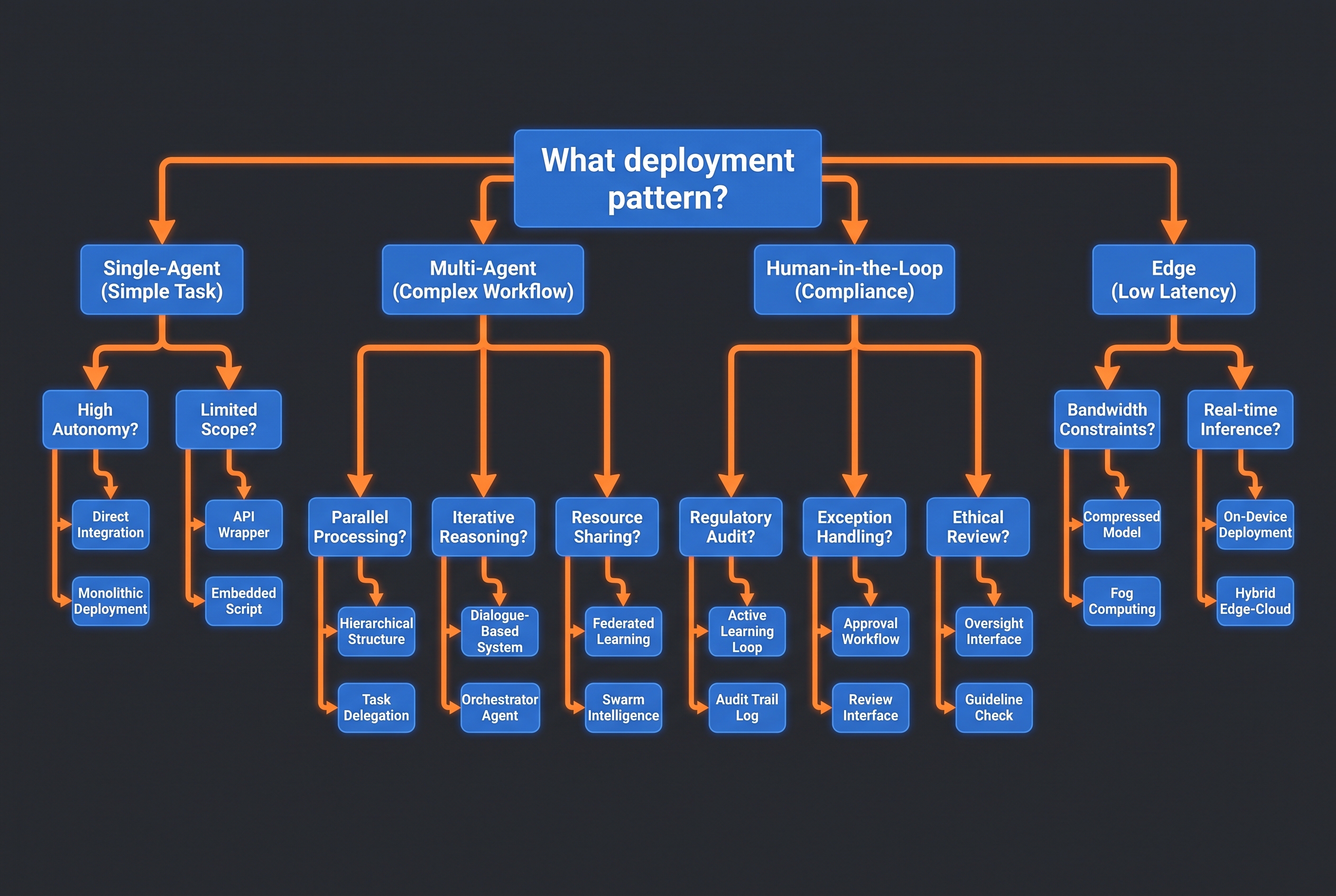
Use this checklist to select the right pattern for your use case:
1. Is this your first AI agent deployment? → Start with single-agent. Always.
2. Does the workflow span multiple specialized domains? → Multi-agent orchestrated.
3. Are there regulatory or compliance requirements for human oversight? → Human-in-the-loop.
4. Is sub-second response time a hard requirement? → Edge deployment.
5. Will multiple agents need to share state? → Multi-agent with shared state store.
6. Are you processing high volumes (500+ tasks/hour)? → Multi-agent for parallelism, or edge for latency.
7. Is the action irreversible or financially significant? → Human-in-the-loop, regardless of agent accuracy.
8. Do you need to operate offline or on-premise? → Edge deployment.
Most enterprises end up with a hybrid: a single-agent pattern for the first use case, evolving into multi-agent orchestration as they add more agents, with human-in-the-loop for high-stakes actions and edge deployment for specific latency-sensitive use cases.
The Bottom Line
AI agent deployment patterns are not a one-time decision. They evolve as your use cases mature, your volume grows, and your organization's trust in AI agents increases. Start simple, measure everything, and let your data — not assumptions — drive when you add complexity.
The organizations that succeed with AI agents in production are not the ones with the most sophisticated architecture. They're the ones who chose the simplest pattern that worked, deployed it with discipline, and scaled deliberately when the evidence demanded it.