AI Email Management: How Enterprises Save 15 Hours Per Employee Every Week (And Why 71% Still Haven't Started)
By Delos Intelligence — 2026-07-18
Employees spend 28% of their workday on email. AI email management recovers 15+ hours per employee weekly. Learn the 5-step framework 71% of companies haven't implemented.
The 15-Hour Hidden Tax
Your average employee spends 28% of their workday on email. That's not a statistic from a vendor whitepaper — it's from McKinsey's Global Institute. For a 500-person company, that's 15 hours per employee per week, or 390,000 hours annually. At an average loaded cost of $60/hour, email is costing you $23.4 million per year in lost productivity.
And 71% of enterprises haven't done anything about it.
The Problem Isn't Volume — It's Triage
The issue isn't that employees receive too many emails. It's that every email requires a decision: respond now, respond later, delegate, archive, ignore. That decision-making tax — multiplied across 120+ emails per day — is what destroys focus and fragments attention.
AI email management eliminates the triage tax. The AI reads, classifies, prioritizes, and drafts responses — so your people spend time on the response, not the decision.
How AI Email Triage Works
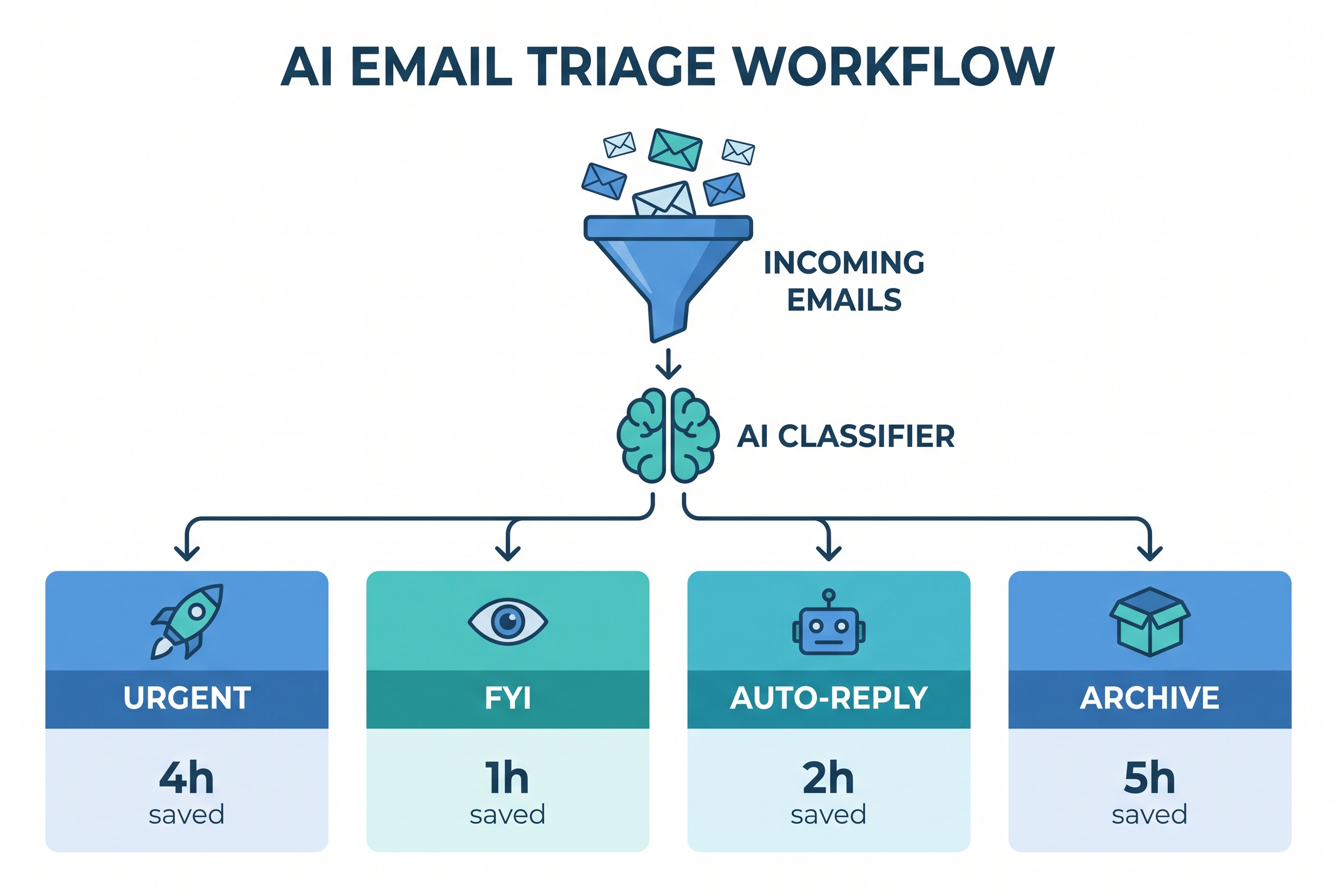
Step 1: Classification
The AI reads every incoming email and classifies it into categories: urgent, action-required, FYI, newsletter, external, internal, calendar-related. It learns from your past behavior — which emails you open immediately, which you archive without reading, which you forward.
Step 2: Priority Scoring
Not all urgent emails are equally urgent. The AI assigns a priority score based on sender hierarchy, deadline proximity, project relevance, and historical response patterns. A message from your CEO about a board meeting tomorrow scores higher than a newsletter about a conference next month.
Step 3: Auto-Reply Drafting
For routine emails — meeting confirmations, status updates, document requests — the AI drafts a response based on your writing style and past replies. You review, edit, and send. Average time saved per drafted reply: 3-4 minutes. Across 40 routine emails per day, that's 2.5 hours saved daily.
Step 4: Archive Suggestions
The AI identifies emails you'll never need again — old newsletters, FYI chains, completed project updates — and suggests archiving them. This keeps your inbox at a manageable size and reduces the cognitive load of seeing 10,000 unread messages.
The 5-Step Implementation Framework
Step 1: Audit Your Email Flow (Week 1-2)
Before deploying AI, understand your current email patterns. Which teams receive the most email? What's the average response time? Which senders generate the most back-and-forth? This baseline tells you where AI will deliver the most value.
Step 2: Start with One Team (Week 3-4)
Don't roll out to everyone at once. Pick a team with high email volume and clear patterns — customer support or sales operations are good candidates. Deploy the AI triage, measure the impact, and collect feedback.
Step 3: Train the AI on Your Patterns (Week 5-6)
The AI needs 2-3 weeks of your email behavior to learn your patterns. During this training period, the AI suggests actions but doesn't execute them. You approve or reject every suggestion, teaching the system your preferences.
Step 4: Enable Automation Gradually (Week 7-8)
Once the AI achieves 90%+ accuracy on suggestions, enable auto-archiving for low-priority emails and auto-drafting for routine replies. Keep human review for all external communications.
Step 5: Scale Across the Organization (Week 9-12)
Roll out to all teams, customized per department. Sales gets CRM-integrated triage. Support gets ticket-routing automation. Executives get priority filtering and calendar-aware scheduling.
ROI by Role
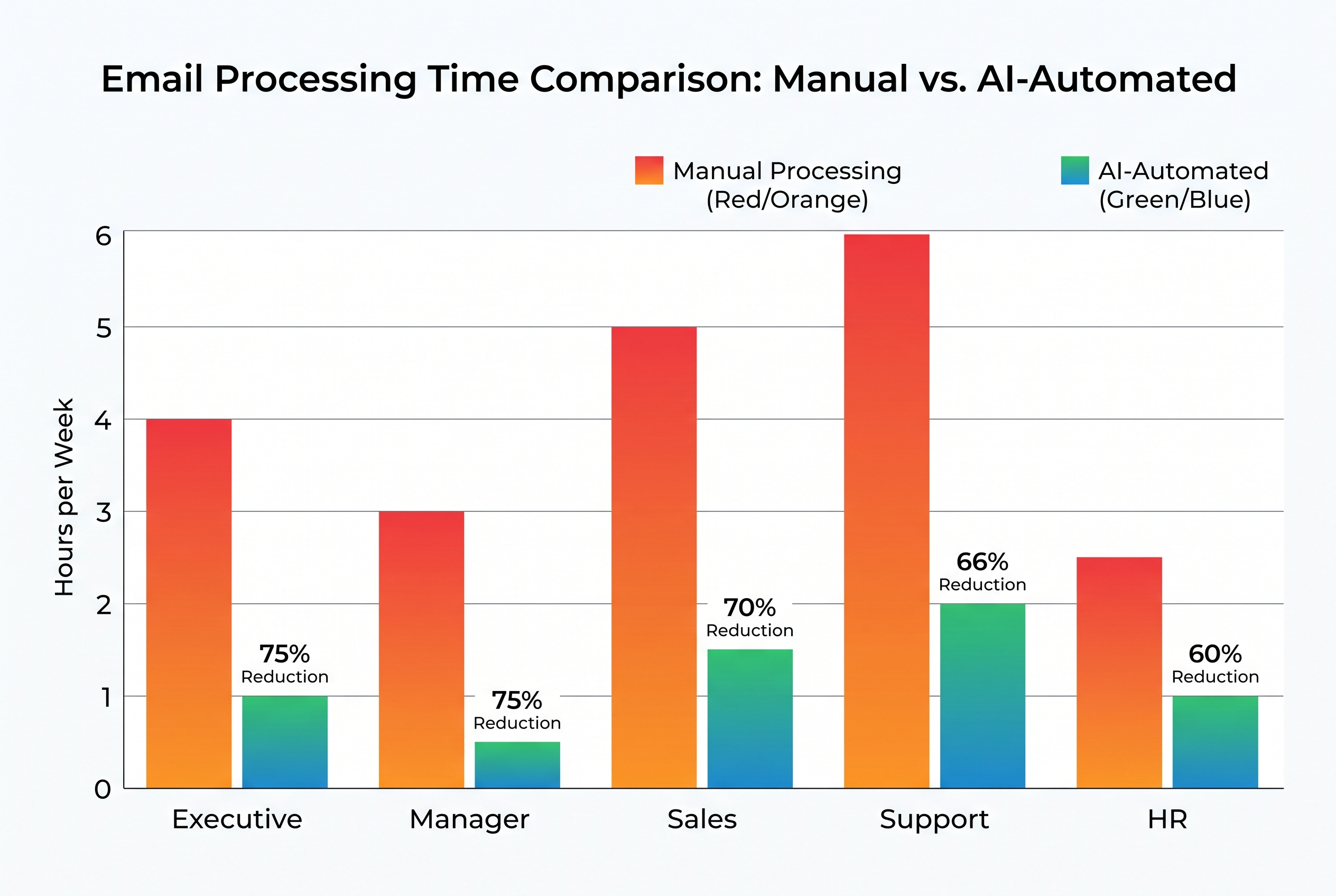
| Role | Hours Saved/Week | Key Benefit |
|------|-------------------|-------------|
| Executives | 8-12 | Focus on strategic work, not inbox management |
| Managers | 12-18 | Faster team coordination, fewer bottlenecks |
| Sales | 10-15 | More time selling, automated follow-up sequences |
| Support | 15-20 | Auto-routing, canned-response drafting, SLA tracking |
| HR | 8-12 | Candidate communication automation, onboarding flows |
!ROI by role showing hours saved per week for executives, managers, sales, support, and HR
Security and Privacy
AI email management requires reading your emails. That raises legitimate security concerns. Here's what to look for:
- Data residency: Ensure the AI processes emails in your region (GDPR, CCPA compliance)
- No training on your data: Your emails should not be used to train models for other customers
- Encryption: Emails must be encrypted in transit and at rest
- Access controls: The AI should operate with the user's permissions, not blanket access
- Audit trail: Every AI action must be logged for compliance
Enterprise-grade tools like Microsoft Copilot for Outlook, Google's Gemini, and specialized platforms like SaneBox and Superhuman AI meet these requirements.
Why 71% Haven't Started
The adoption gap comes down to three barriers:
1. Trust Gap
Executives worry about AI misclassifying important emails or sending embarrassing auto-replies. The fix: start with suggestions-only mode, build trust through 90%+ accuracy, then enable automation.
2. Integration Complexity
Email doesn't exist in isolation. It connects to CRM, project management, calendars, and document systems. The AI needs to integrate with all of them. The fix: choose tools with native integrations or API access.
3. Change Management
Employees resist AI managing their inbox. It feels like a loss of control. The fix: frame it as "AI as assistant, not AI as replacement." The AI suggests; the human decides.
The Bottom Line
15 hours per employee per week. That's what email is costing you. AI email management can recover 60-70% of that time — but only if you deploy it with the right framework, the right security, and the right change management approach.
The 29% of enterprises that have already started are compounding their advantage. Every week you wait is another 15 hours per employee lost.