AI Workers for Enterprise ERP: Automating SAP, Oracle & NetSuite
By Delos Intelligence — 2026-08-24
AI Workers sit above SAP, Oracle, and NetSuite to automate AP, month-end close, procurement, and HR workflows — delivering 36,700€/month in savings with a 6-10 week payback.
Enterprise ERP systems — SAP, Oracle, and NetSuite — represent decades of accumulated business logic, terabytes of operational data, and millions in implementation investment. They also represent one of the richest, most underutilized opportunities for AI augmentation in the modern enterprise.
AI Workers do not replace ERP systems. They sit above them: reading from modules, executing transactions, coordinating cross-system workflows, and surfacing insights — all without the manual effort that consumes finance, HR, procurement, and supply chain teams today.
This guide covers how AI Workers integrate with the three dominant ERP platforms, which workflows deliver the fastest ROI, and what a production deployment looks like.
Why ERP Automation Has Stalled — Until Now
ERP systems have always promised end-to-end automation. They have never fully delivered it. The gap is not in the ERP itself — SAP S/4HANA, Oracle Fusion, and NetSuite are powerful, comprehensive platforms. The gap is in the interface between the ERP and the humans who use it.
The manual bridge problem: Most ERP workflows still rely on humans to translate information between modules, interpret system outputs, and take action based on what they see. An accounts payable clerk reviews an invoice in SAP, cross-references it in the vendor master, checks the purchase order in the procurement module, and manually flags exceptions. Every step involves human attention and introduces delay.
Configuration complexity: ERP customization is expensive and fragile. Every business-specific rule — three-way match tolerances, approval thresholds, vendor credit limits — requires custom development or complex workflow configuration that few teams have the capacity to maintain.
The integration tax: Connecting ERP to CRM, HRIS, logistics, and customer portals requires middleware that breaks, needs maintenance, and creates data latency.
AI Workers eliminate the manual bridge. They read system outputs, apply business rules, execute transactions via APIs, and coordinate across systems — continuously, without configuration debt.
The AI Worker Integration Architecture for ERP
!AI Worker ERP Integration Architecture
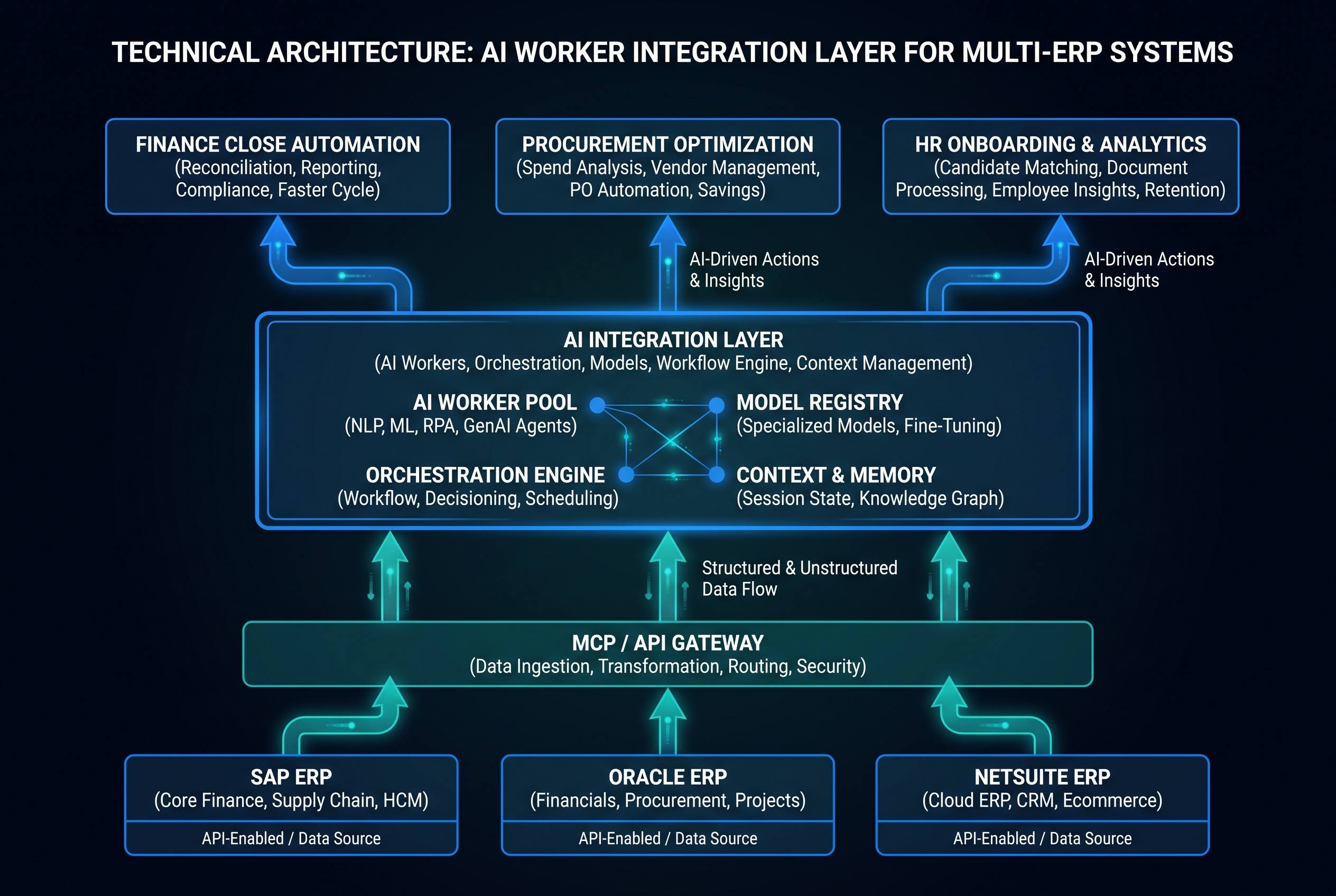
AI Workers connect to ERP systems through three integration layers:
Layer 1: Read access via reporting APIs. AI Workers query ERP modules using standard APIs (SAP OData, Oracle REST, NetSuite SuiteTalk) to retrieve invoices, purchase orders, employee records, financial reports, and operational data. No ERP customization required.
Layer 2: Transactional write access via scoped service accounts. For workflows requiring updates — approving invoices, creating journal entries, updating vendor records — AI Workers authenticate via dedicated service accounts with minimum necessary permissions. Every action is logged to an immutable audit trail.
Layer 3: Event-driven triggers via webhooks or scheduled polling. ERP events (new invoice posted, purchase order approved, payroll cycle initiated) wake the AI Worker and provide context. The worker processes the event, takes action, and reports back.
This architecture is platform-agnostic. The same AI Worker logic runs against SAP, Oracle, or NetSuite — the integration layer handles platform differences.
SAP S/4HANA: Top AI Worker Use Cases
SAP dominates enterprise ERP for large organizations. The highest-ROI AI Worker workflows in SAP environments:
Accounts Payable Automation
Manual AP processing costs €5-15 per invoice in large enterprises. AI Workers reduce this to under €0.50 by automating:
- Invoice ingestion and validation: Extracts data from PDF invoices, validates against purchase orders and goods receipts (three-way match), flags discrepancies for human review.
- Exception handling: For mismatches below configurable thresholds (e.g., price variance <2%), the AI Worker auto-approves and creates the accounting entry. Above threshold, it escalates with a structured summary of the discrepancy.
- Vendor communication: Automatically sends exception notifications to vendors, requests corrected invoices, and tracks resolution.
Measured result: Enterprises using AI Worker AP automation in SAP report 70-85% reduction in manual invoice processing time and 60% reduction in days payable outstanding variance.
Month-End Close Acceleration
The financial close process in SAP typically takes 5-8 business days. AI Workers compress this to 1-2 days by automating:
- Intercompany reconciliation across entities
- Automated journal entry creation for recurring transactions
- Balance sheet account reconciliation with exception flagging
- Close checklist management with real-time status updates
Measured result: 65% reduction in close cycle time; finance team focus shifts from data preparation to analysis.
Procurement Workflow Automation
- Automated purchase requisition creation from inventory signals
- Vendor selection against pre-negotiated catalogs
- PO creation, approval routing, and GR matching
- Spend analysis and savings opportunity identification
Oracle Fusion Cloud: Top AI Worker Use Cases
Oracle Fusion's strength is its breadth — financials, HR, supply chain, and CX in a unified cloud platform. AI Workers unlock the cross-module workflows that Oracle users rarely automate:
Procure-to-Pay Orchestration
Oracle's procure-to-pay process spans sourcing, procurement, receiving, AP, and payments — typically involving 4-6 teams. AI Workers orchestrate end-to-end:
1. Demand signal triggers requisition creation
2. AI Worker validates against budget availability and sourcing rules
3. PO issued to approved vendor via Oracle Procurement
4. Goods receipt matched automatically against PO
5. Invoice validated and payment initiated within terms
6. Exception report generated for any breaks in the chain
Manual touchpoints reduced from 12-15 to 2-3 (budget approval and payment authorization).
HR Workflow Automation in Oracle HCM
Oracle HCM manages the employee lifecycle. AI Workers automate high-volume, rule-based HR tasks:
- Onboarding orchestration: New hire record creation, system access provisioning, training assignment, benefits enrollment initiation — all triggered by the hire event in Oracle HCM.
- Leave and absence management: Policy-based absence approval, payroll impact calculation, coverage coordination.
- Performance cycle management: Goal-setting reminders, review form distribution, completion tracking, calibration data preparation.
Measured result: HR teams using AI Workers in Oracle HCM report 55% reduction in administrative tasks and 40% improvement in time-to-productivity for new hires.
NetSuite: Top AI Worker Use Cases
NetSuite is the ERP of choice for mid-market and fast-growing companies. Its flexibility and API-first architecture make it particularly well-suited for AI Worker integration.
Revenue Recognition Automation
ASC 606 / IFRS 15 compliance requires complex, contract-specific revenue recognition logic. NetSuite AI Workers automate:
- Contract value allocation across performance obligations
- Recognition schedule creation and maintenance
- Deferred revenue waterfall management
- Revenue adjustment processing for contract modifications
Teams that previously spent 3-4 days per month on manual revenue recognition complete the process in 4-6 hours.
Inventory and Demand Planning
NetSuite's inventory module generates rich demand signals. AI Workers translate these into action:
- Reorder point monitoring with automatic PO creation
- Supplier lead time tracking and early warning alerts
- Safety stock optimization based on demand variability
- Dead stock identification and markdown recommendations
Measured result: 25-35% reduction in stockout incidents; 15-20% reduction in carrying costs.
Automated Financial Reporting
Monthly board reporting in NetSuite typically requires 2-3 days of manual data assembly. AI Workers automate:
- Saved search execution and data normalization
- Variance analysis against budget and prior period
- Commentary generation for material variances
- Distribution to stakeholders in configured formats
ROI Framework for ERP AI Worker Deployments
| Workflow | Manual Cost/Month | AI Worker Cost/Month | Monthly Saving |
|---|---|---|---|
| AP processing (500 invoices) | €7,500 | €400 | €7,100 |
| Month-end close (5-person team) | €15,000 | €2,000 | €13,000 |
| Procurement orchestration | €8,000 | €600 | €7,400 |
| HR onboarding (20 hires/month) | €4,000 | €300 | €3,700 |
| Revenue recognition | €6,000 | €500 | €5,500 |
| Total | €40,500 | €3,800 | €36,700 |
Typical payback period: 6-10 weeks.
5-Phase Implementation Roadmap
Phase 1: Discovery (Weeks 1-2)
Map your highest-volume, highest-manual-effort ERP workflows. Prioritize by: (a) transaction volume × manual time per transaction; (b) error rate and downstream impact; (c) data availability for AI Worker access.
Phase 2: Read-Only Integration (Weeks 3-4)
Deploy AI Workers in read-only mode. Workers observe, report, and recommend actions — but execute nothing. This validates integration, builds stakeholder confidence, and establishes baseline metrics.
Phase 3: Supervised Execution (Weeks 5-8)
Enable write access for low-risk, high-confidence actions (e.g., auto-approve invoices below €500 with 100% three-way match). Human approval required for all other actions. Monitor approval rate — target 95%+ auto-approval within 30 days.
Phase 4: Autonomous Execution (Weeks 9-12)
Expand autonomous execution to higher-value transactions. Implement circuit breakers (automatic pause if error rate exceeds 0.5%). Establish weekly review cadence with finance/ops teams.
Phase 5: Cross-System Orchestration (Month 4+)
Connect AI Workers across ERP modules and external systems. Enable end-to-end workflow automation (procure-to-pay, hire-to-retire, order-to-cash). Deploy continuous monitoring and ROI dashboards.
Security and Compliance Considerations
ERP systems contain the most sensitive data in the enterprise. AI Worker deployments must address:
Principle of least privilege: Each AI Worker receives a dedicated service account with access scoped to required modules and transaction types only. No admin access, no cross-tenant access.
Immutable audit trails: Every AI Worker action in the ERP is logged with timestamp, worker ID, action type, input data (redacted for sensitive fields), and outcome. Audit logs are exported to SIEM for compliance reporting.
Approval thresholds: All financial transactions above configurable thresholds route to human approval, regardless of AI Worker confidence level. Thresholds are defined by finance leadership and enforced in the integration layer.
Data residency: AI Workers process ERP data within the same geographic boundary as the ERP system. No cross-border data transfer for EU deployments.
The Bottom Line
AI Workers do not require ERP replacement or major re-implementation. They add an intelligent automation layer above existing SAP, Oracle, and NetSuite investments — executing the manual work that consumes your best people and extracting value from the data your ERP has always collected.
The ROI is measurable in weeks, not quarters. The implementation path is proven. The question is which workflows you automate first.